II: ByteBuddy入门笔记2
bytebuddy 410 words 3 min read
This post is not yet available in English. Showing the original.
OnMethodEnter Advice
先编写一个入门示例 项目源码结构如下
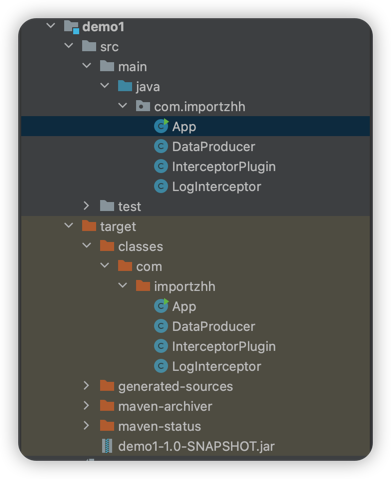
pom.xml
<project>
    <properties>
        <project.build.sourceEncoding>UTF-8</project.build.sourceEncoding>
    </properties>

    <dependencies>
        <dependency>
            <groupId>junit</groupId>
            <artifactId>junit</artifactId>
            <version>3.8.1</version>
            <scope>test</scope>
        </dependency>
    </dependencies>

    <build>
        <plugins>
            <plugin>
                <groupId>net.bytebuddy</groupId>
                <artifactId>byte-buddy-maven-plugin</artifactId>
                <version>1.14.5</version>
                <executions>
                    <execution>
                        <goals>
                            <goal>transform</goal>
                        </goals>
                    </execution>
                </executions>
                <configuration>
                    <transformations>
                        <transformation>
                            <plugin>com.importzhh.InterceptorPlugin</plugin>
                        </transformation>
                    </transformations>
                </configuration>
            </plugin>
        </plugins>
    </build>
</project>
DataProducer.java
package com.importzhh;

public class DataProducer {
    public DataProducer() {
    }

    public void create() {
        System.out.println("Method start");
        System.out.println("create data");
    }
}
LogInterceptor.java
package com.importzhh;

import net.bytebuddy.asm.Advice;

public class LogInterceptor {
    @Advice.OnMethodEnter
    public static void start() {
        System.out.println("Method start");
    }
}
package com.importzhh;
import net.bytebuddy.asm.Advice;
import net.bytebuddy.build.Plugin;
import net.bytebuddy.description.type.TypeDescription;
import net.bytebuddy.dynamic.ClassFileLocator;
import net.bytebuddy.dynamic.DynamicType;
import net.bytebuddy.matcher.ElementMatchers;
import java.io.IOException;
public class InterceptorPlugin implements Plugin {
@Override
public DynamicType.Builder<?> apply(DynamicType.Builder<?> builder, TypeDescription typeDescription, ClassFileLocator classFileLocator) {
return builder.visit(Advice.
to(LogInterceptor.class).
on(ElementMatchers.named("create")));
}
@Override
public void close() throws IOException {
System.out.println("InterceptorPlugin close method");
}
@Override
public boolean matches(TypeDescription target) {
System.out.println("Inspecting" + target.getName());
if (target.getName().equals(DataProducer.class.getName())) {
System.out.println("Found target code : " + target.getName());
return true;
} else {
System.out.println("Inspected code" + target.getName() + "is not the target code");
return false;
}
}
}App.java
package com.importzhh;

/**
 * Hello world!
 */
public class App {
    public static void main(String[] args) {
        System.out.println("Hello World!");
        new DataProducer().create();
    }
}在InterceptorPlugin中定义了字节码转换规则(即为 DataProducer.create 方法添加日志),接下来的步骤是编译并测试这个插件。
- 编译:你可以使用Maven进行编译,确保整个项目没有语法错误和依赖问题。在项目的根目录运行以下命令进行编译:
mvn clean install- 运行:
InterceptorPlugin定义了对DataProducer.create方法的转换逻辑。
在编译阶段,ByteBuddy Maven插件应该会修改 DataProducer 类的字节码,并为 create 方法添加 “Method start” 的输出。因此,调用 DataProducer.create 应该能看到这个输出。
运行这个 App.java 测试,如果一切正常,那么在控制台中应该看到 “Method start” 的输出。
Hello World!
Method start
create data